Best Dive Computer for Beginners
Posted by Anthony Grote on October 25th, 2026
Our Guide to the Best Dive Computer for Beginner Divers
Choosing your first dive computer can feel more complicated than it needs to be. As an experience diver that has been diving for more than 30 years, I’ve dived with plenty of new divers who often ask the same question: do you start with a simple, inexpensive computer, or spend more on something you can grow into? There isn’t one right answer for everyone, but there are a few things to prioritize — a display you can read quickly underwater, controls that make sense, reliable decompression information, and enough functionality for the type of diving you’re likely to do next.
This guide is a more focused companion to our full Best Dive Computers roundup. For that guide, our Bluewater team drew on extensive real-world experience with dive computers across a wide range of conditions, depths and destinations, with input from instructors, experienced divers and our dive-travel team. We paid particular attention to display clarity, menu navigation, battery performance, connectivity, safety features and overall value. For this beginner-specific guide, I’ve narrowed those criteria further: how easy is the computer to understand when you’re still building experience, and how quickly are you likely to outgrow it?
That distinction matters. A beginner dive computer doesn’t have to be the cheapest or most basic model available. In fact, some of the best options for new divers are computers such as the Shearwater Peregrine and Suunto Nautic, which offer considerably more capability than you’ll need on your first few dozen dives but remain straightforward when used for recreational diving. At the other end of the spectrum, computers like the Mares Puck 4 and Cressi Donatello keep things simple and affordable while still covering the essentials. The Cressi Da Vinci falls somewhere in between, with a modern color display and additional features without moving fully into premium territory.
For each computer below, I’ve looked beyond the spec sheet and considered the things that actually matter when you’re underwater: Can you find your depth and no-decompression limit at a glance? Are the menus easy to work through? Does it support Nitrox when you’re ready for that next certification? What happens when your diving becomes more advanced? And, importantly, are you paying for features that you’re realistically going to use?
Whether you’ve just completed Open Water, are putting together your first set of scuba diving equipment, or already know that diving is going to become a long-term hobby, the computers in this guide offer different ways to get started. The goal isn’t to find the computer with the longest feature list. It’s to find one that gives you clear, useful information underwater and still makes sense for the diver you’re likely to become.
Quick Guide to the Best Dive Computer for Beginners:
- Best Overall Dive Computer for beginners - Shearwater Peregrine Dive Computer
- Best Value Dive Computer - Mares Puck 4
- Best Budget Dive computer for Beginners - Cressi Donatello
- Best Color Screen Dive Computer for Beginners - Cressi da Vinci
- Best Premium Dive Computer for Beginners - Suunto Nautic
- Jump to Section -
Comparison Table of Our Best Dive Computers for Beginners
| Model | Display | Gas Modes | Air Integration | Depth Rating | Battery | Algorithm | Smart Features | Shop |
|---|---|---|---|---|---|---|---|---|
| Shearwater Peregrine | 2.2″ full-color LCD (320×240) | Air, Nitrox, 3-Gas Nitrox, Gauge | No | 120 m / 394 ft | Rechargeable Li-ion, up to ≈30 h | Bühlmann ZHL-16C + Gradient Factors | Bluetooth, wireless charging, vibration alerts, customizable display, firmware updates | Buy Now |
| Mares Puck 4 | 800-segment chip-on-glass LCD | Air, Nitrox, up to 3 gases, Bottom Timer | No | 150 m / 492 ft | User-replaceable CR2450, rated for ≈100 dives | Bühlmann ZH-L16C + customizable Gradient Factors | Bluetooth, Mares / SSI app connectivity, dive planner, 100-dive logbook, firmware updates | Buy Now |
| Cressi Donatello | High-contrast LCD with large digits and backlight | Air, Nitrox, Gauge, Free / Apnea | No | 150 m / 492 ft | User-replaceable CR2430 | Cressi RGBM | One-button control, backlight, dive planner, freediving mode, optional Bluetooth interface | Buy Now |
| Cressi Da Vinci | 1.54″ full-color TFT LCD | Air, Nitrox, Gauge; up to 4 gas mixes | No | 100 m / 330 ft | Rechargeable Li-ion, USB-C, up to ≈30 dive h | Bühlmann ZHL-16C + adjustable conservatism / Gradient Factors | Digital compass, Bluetooth, DiveSync app, USB-C charging, multi-gas switching | Buy Now |
| Suunto Nautic | 3.26″ full-color AMOLED (720×382) | Single Gas Air / Nitrox, Multigas Air / Nitrox / Trimix, up to 5 gases | Yes, with optional Suunto Tank POD | 200 m / 656 ft | Rechargeable Li-ion, up to ≈120 h dive time | Suunto Bühlmann 16 GF, based on ZHL-16C | Wireless tank pressure, GPS, offline maps, digital compass, underwater route tracking, Bluetooth, LED flashlight | Buy Now |
The Best Overall Dive Computer for Beginners
Shearwater Peregrine Dive Computer
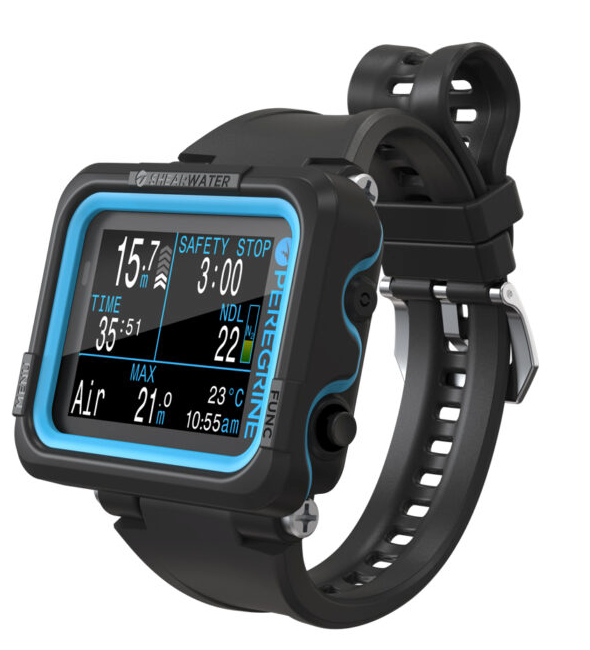
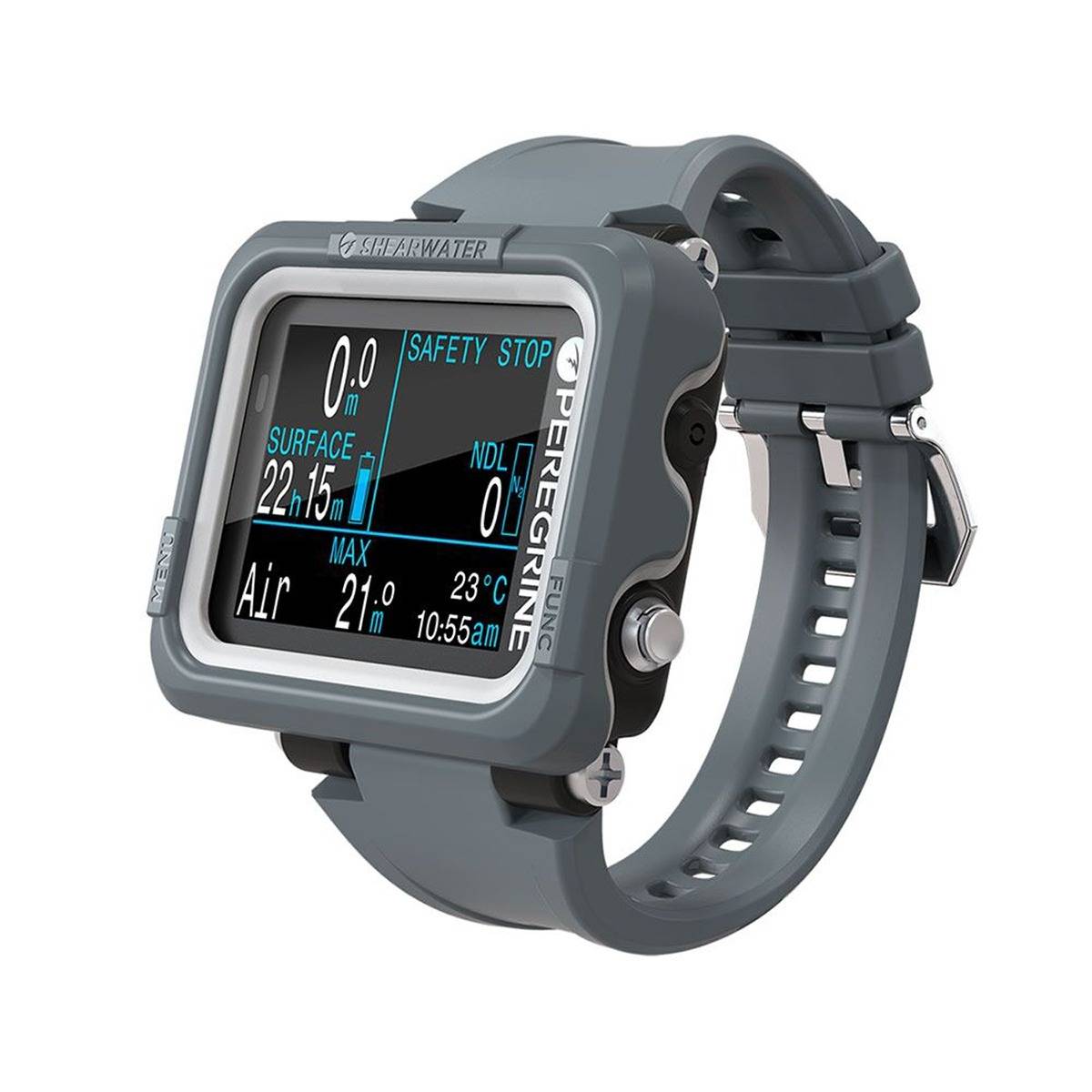
We recommend the Shearwater Peregrine as our best overall dive computer for beginners because it combines a clear display, straightforward controls and enough capability to remain useful well beyond a diver’s first certifications. Its 2.2-inch full-color screen makes essential information such as depth, dive time and no-decompression limits easy to read, while the two-button interface keeps navigation relatively simple.
The Peregrine uses the Bühlmann ZHL-16C decompression algorithm with Gradient Factors, giving beginners the option to use preset conservatism settings while allowing more experienced divers to customize them later. It supports Air, Nitrox and up to three gas mixes, as well as decompression diving, so there is plenty of room to grow without immediately needing a more advanced computer.
Practical features include around 30 hours of battery life, wireless charging, Bluetooth connectivity to Shearwater Cloud and vibration alerts. What makes the Peregrine stand out is the balance it strikes: it is simple enough for a first-time computer owner, but capable enough that most recreational divers are unlikely to outgrow it quickly.
Who is the Shearwater Peregrine best for?
The Peregrine is best suited to new and recreational divers who want to invest in a computer they can keep using as their experience grows. It is particularly appealing to divers who value a large, readable display and a simple interface, or who plan to progress into Nitrox and more advanced recreational diving.
It is also a good fit for divers who prefer a dedicated dive computer rather than a smartwatch-style device with additional fitness and everyday features.
Who is it less suited for?
The Peregrine may be more computer than necessary for someone looking for the lowest-cost option for occasional recreational diving. Models such as the Mares Puck 4 or Cressi Donatello cover the basics for less.
The standard Peregrine also lacks wireless air integration and a built-in digital compass. Divers who want those features should consider the Peregrine TX or another air-integrated model. It also does not support Trimix, CCR or a dedicated freediving mode, so divers with those specific goals may be better served by a more specialized computer.
The Best Value Dive Computer for Beginners
Mares Puck 4 Dive Computer
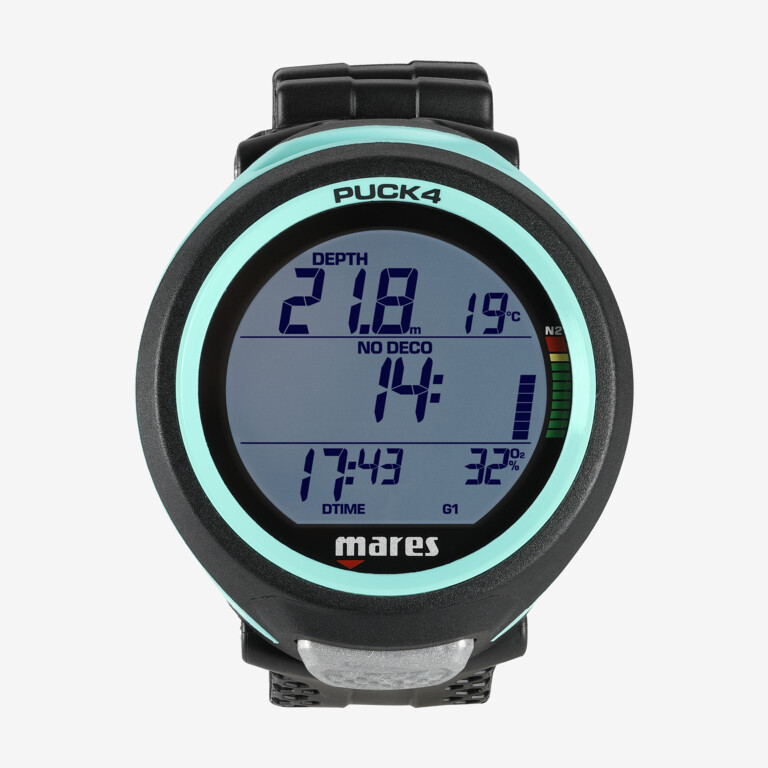
We have found the Mares Puck 4 to be our best value dive computer for beginners because it combines straightforward operation with features normally associated with more advanced computers. Its large segmented display keeps key dive information easy to read, while a single-button interface handles menus and settings without adding unnecessary complexity.
Under the hood, the Puck 4 uses the Bühlmann ZH-L16C decompression algorithm with adjustable Gradient Factors. New divers don't need to start changing those settings, but having them available gives the computer considerably more room to grow. It supports Air, Nitrox and Bottom Timer modes, along with up to three gases for divers who progress into more advanced diving.
Other practical features include built-in Bluetooth for transferring dives to the Mares or MySSI app, a 100-dive logbook and a user-replaceable CR2450 battery, which Mares rates for more than 100 dives under typical conditions.
What makes the Puck 4 particularly compelling for a beginner is that you're not paying for a color screen, air integration or smartwatch features you may never use. Instead, the money goes toward a capable decompression algorithm, simple controls and the core functions recreational divers actually need.
Who is the Mares Puck 4 best for?
The Puck 4 is best suited to new divers who want to keep their first computer relatively affordable without buying something they are likely to outgrow quickly. It covers straightforward recreational diving very well, while Nitrox, multi-gas support and adjustable Gradient Factors leave room for further training.
It is also a good choice for travelers or occasional divers who prefer a replaceable battery rather than having another device that needs to be charged before a dive trip.
Who is it less suited for?
The Puck 4 is less suited to divers who want the large color display and more visual interface offered by computers such as the Shearwater Peregrine or Cressi Da Vinci. Its segmented screen is functional and easy to read, but considerably more basic.
The single-button interface is simple, although moving through longer menus can take more button presses than a two- or three-button computer. It also lacks wireless air integration and a digital compass, so divers who already know they want those features should look further up the range.
For beginners primarily interested in a polished color display or premium features, there are better choices. For someone who wants a dependable first computer with a surprisingly capable feature set for the money, however, the Puck 4 is difficult to overlook.
The Best Budget Dive Computer for Beginners
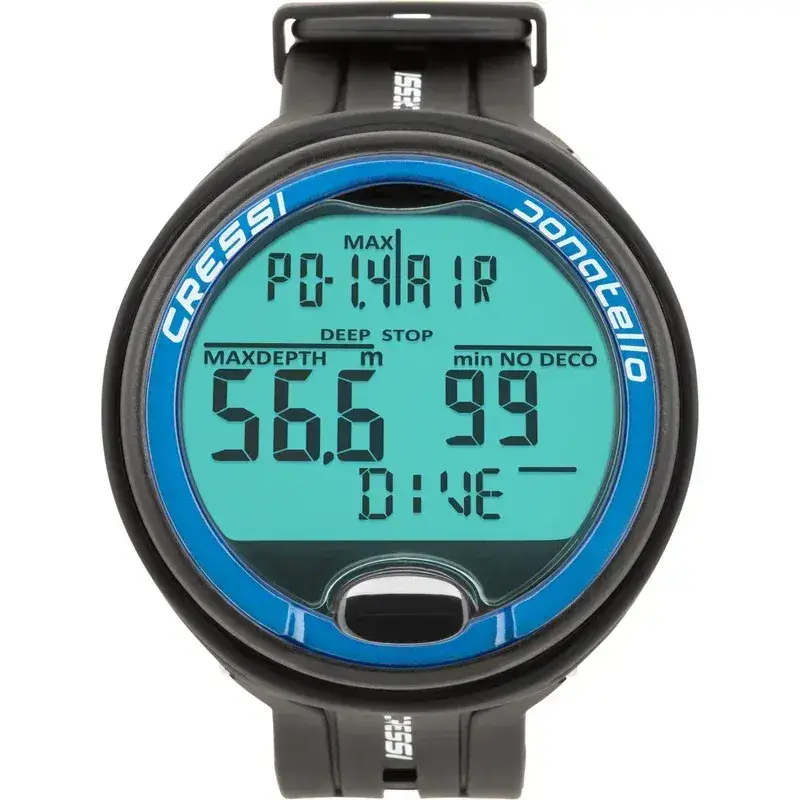
Cressi Donatello Dive Computer
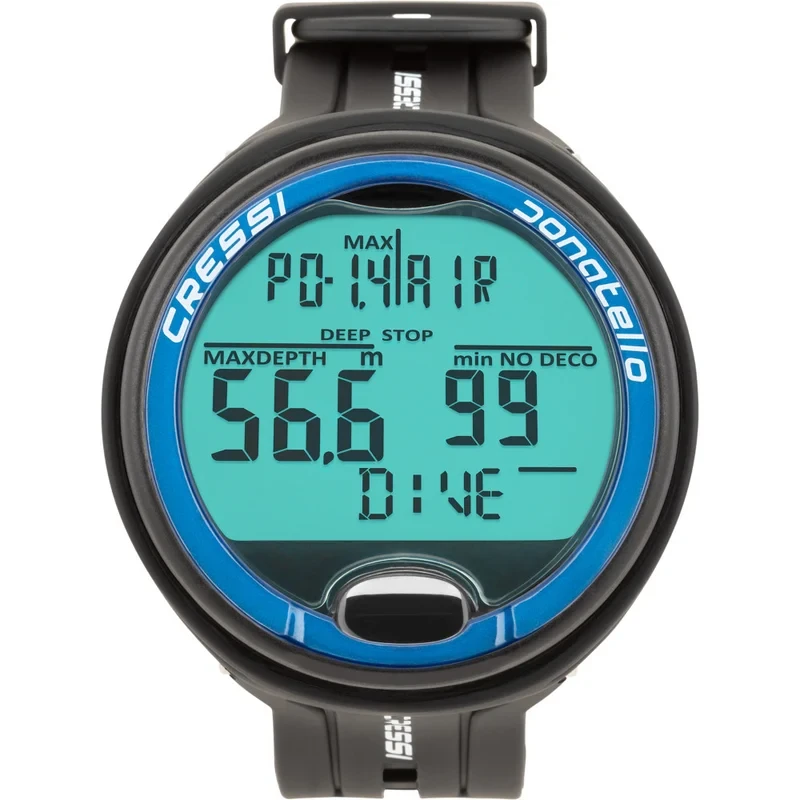
We found the Cressi Donatello to be our best budget dive computer for beginners because it covers the essentials without adding much complexity. Its high-contrast display uses large numbers that are easy to pick out underwater, while the single-button interface keeps menu navigation straightforward. For a diver who mainly needs reliable depth, dive time, no-decompression limits and ascent information, there is little unnecessary clutter.
The Donatello uses Cressi's RGBM decompression algorithm and offers Air, Nitrox, Gauge and Free/Apnea modes. Nitrox can be set up to 50% oxygen, although it is limited to a single gas mix during the dive. There are also adjustable safety-factor settings, ascent-rate and PPO2 alarms, dive planning and support for repetitive multi-day diving.
Another advantage for beginners is the user-replaceable CR2430 battery, which removes the need to recharge the computer before a trip. Bluetooth connectivity is available through an optional interface for transferring and reviewing dives in Cressi's app. The replaceable screen protector is also a useful touch on a computer likely to see plenty of use on dive boats and during training.
The Donatello doesn't try to compete with more expensive color-screen computers. Instead, it provides the core functions a new recreational diver needs in a simple and relatively affordable package, which is exactly why it earns our budget pick.
Who is the Cressi Donatello best for?
The Donatello is best suited to new divers who want a straightforward first computer without spending heavily on features they may not use. The large display and simple controls make it particularly approachable during those first dives when there is already plenty to monitor underwater.
Its dedicated freediving mode also makes it worth considering for divers who split their time between scuba and apnea, while Nitrox support provides enough flexibility for the natural next step in recreational training.
Who is it less suited for?
The Donatello is less suited to divers looking for a color display, built-in compass or wireless air integration. Those features require stepping up to a more sophisticated computer.
Its single-button interface is easy to understand, although working through settings can require more button presses than a multi-button computer. It is also limited to one gas mixture during a dive, so divers expecting to progress into multi-gas decompression diving will eventually need something more capable.
For a beginner whose priorities are simplicity, readability and keeping the initial investment sensible, however, the Donatello does the important things well without making the computer itself another skill to master.
Best Color Screen Dive Computer for Beginners
Cressi da Vinci Dive Computer
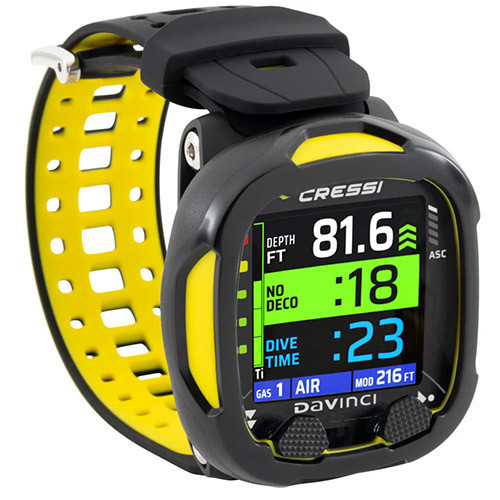
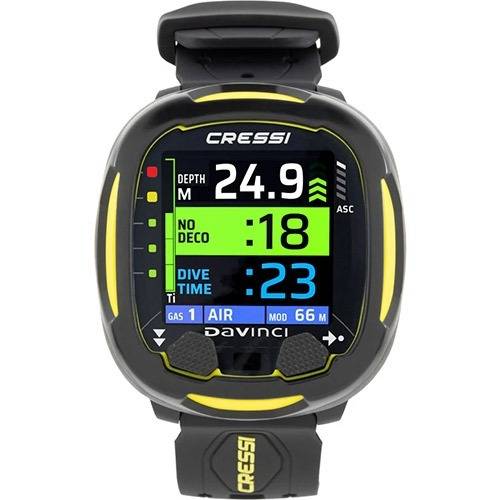
The Cressi Da Vinci is our best color-screen dive computer for beginners, combining an easy-to-read full-color TFT display with a useful set of recreational and more advanced dive features. The large, high-contrast numbers make important information easy to pick out underwater, while the interface remains approachable for someone moving on from rental gear to their first computer.
The Da Vinci runs the Bühlmann ZHL-16C decompression algorithm with adjustable Gradient Factors, so beginners can keep things straightforward while more experienced divers have greater control over conservatism later on. It has Air, Nitrox and Gauge modes and can manage up to four gas mixes, including gas switches during a dive.
A built-in digital compass is another useful addition at this level, particularly for divers beginning to work on underwater navigation. The rechargeable battery uses USB-C, while Bluetooth connectivity allows dives to be transferred to Cressi's DiveSync app. It also comes with both a silicone strap and a bungee option.
What separates the Da Vinci from more traditional beginner computers is the way information is presented. If you prefer a bright color display over a conventional segmented screen but don't need the features of a premium technical computer, it occupies a useful middle ground.
Who is the Cressi Da Vinci best for?
The Da Vinci is best suited to new and recreational divers who place a high priority on display clarity and want something more modern than a basic monochrome computer. The integrated compass also makes it appealing to divers who would rather have navigation and dive information on one device.
There is enough capability for progression, too. Nitrox support, multiple gases and adjustable Gradient Factors mean it should continue to serve many divers well beyond their initial certification.
Who is it less suited for?
The Da Vinci is less suited to beginners whose main priority is keeping the cost of their first computer as low as possible. Simpler computers such as the Mares Puck 4 or Cressi Donatello cover the essentials without the added cost of a color screen, rechargeable battery and compass.
It also has only Air, Nitrox and Gauge operating modes, with no dedicated freediving mode, so divers who regularly combine scuba and apnea may want a computer designed for both.
For recreational divers who value clear information, a built-in compass and a modern display, however, the Da Vinci offers a well-balanced step up from a traditional entry-level computer.
Best Premium Dive Computer for Beginners
Suunto Nautic Dive Computer
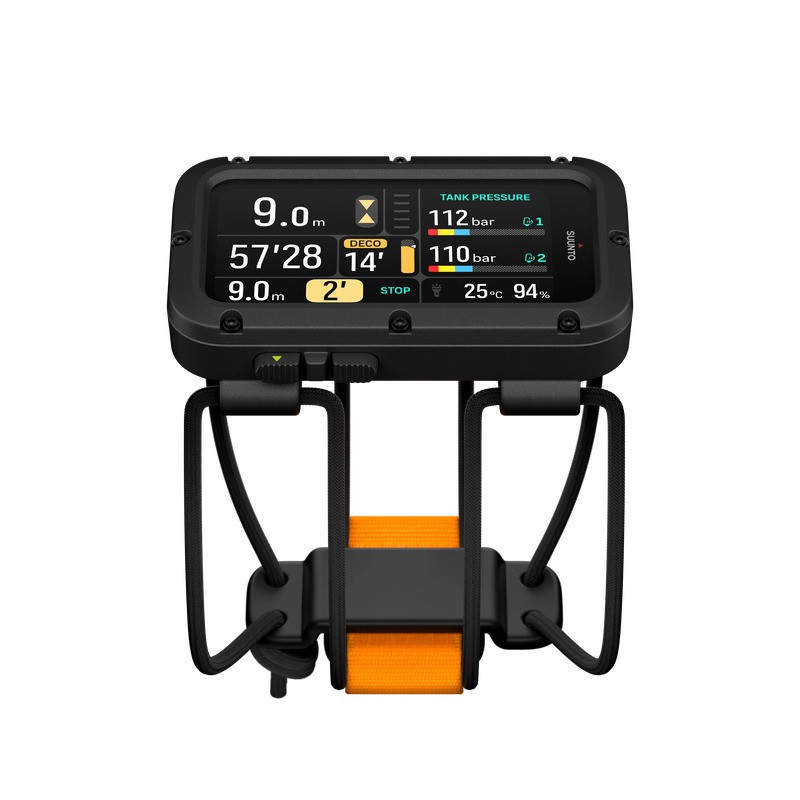
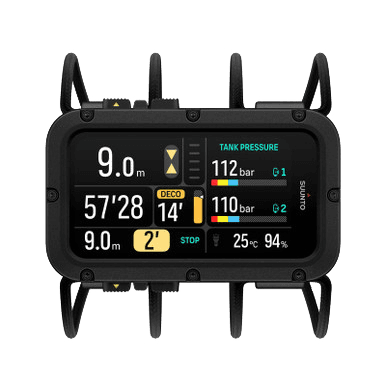
The Suunto Nautic is our best premium dive computer for beginners because it combines an exceptionally large, readable display with a recreational mode that keeps things relatively simple for new divers. Its 3.26-inch AMOLED screen gives key information plenty of space, while physical buttons remain easy to operate with gloves. Suunto's dedicated Single Gas mode is specifically intended for no-decompression recreational diving with Air or Nitrox, so beginners don't need to work through the computer's more advanced functions from the outset.
The Nautic uses the Suunto Bühlmann 16 GF decompression model and offers considerably more capability as a diver progresses. Multi-gas and Trimix support, decompression planning and customizable dive views are available for more advanced diving, while optional Suunto Tank POD integration adds wireless tank pressure, remaining gas time and gas-consumption information.
It also includes a built-in digital compass, GPS and offline maps, vibration alerts and a rechargeable battery rated for up to 120 hours of diving. These aren't necessities for a newly certified diver, but they help make the Nautic a computer that can remain useful for many years rather than something that needs replacing as soon as your diving becomes more ambitious.
What earns the Nautic its premium position is not simply the number of features. It is the combination of excellent readability, a straightforward recreational mode and considerable room to grow. You're paying substantially more than you would for an entry-level computer, but you're also unlikely to outgrow it quickly.
Who is the Suunto Nautic best for?
The Nautic is best suited to beginners who are comfortable spending more upfront for a computer they can grow into. Its large AMOLED display makes it particularly appealing to divers who prioritize clear, easily accessible information underwater.
It is also a strong option for divers who expect to add wireless air integration, more advanced Nitrox or multi-gas diving later. Those capabilities are available without making them part of the beginner experience on day one.
Who is it less suited for?
The Nautic is less suited to divers looking for a compact or inexpensive first computer. At around 101 x 66 mm and 227 g with the bungee setup, it is substantially larger than a wristwatch-style computer and will be more computer than many occasional recreational divers need.
Its advanced features also add cost without necessarily adding much value for someone who expects to stay with straightforward single-gas recreational diving. A Shearwater Peregrine, Mares Puck 4 or Cressi Donatello may make more sense in that situation.
The full-size Nautic also focuses on scuba rather than offering a dedicated freediving mode. Divers wanting a smaller computer for both scuba and apnea should look at alternatives such as the Suunto Nautic S instead.
Frequently Asked Questions About Dive Computers for Beginners
What is the best dive computer for a beginner?
For most beginners, we recommend the Shearwater Peregrine as the best overall dive computer. It has a large, easy-to-read color display, straightforward controls, and enough capability to remain useful as your diving progresses. Beginners who want to spend less should also consider the Mares Puck 4 or Cressi Donatello.
Is the Shearwater Peregrine overkill for a beginner?
Not necessarily. The Peregrine can handle diving well beyond the requirements of an Open Water diver, but its interface is actually one of its biggest strengths for beginners. You do not need to use its more advanced features immediately. The main downside is price: if you only dive occasionally, a simpler computer may provide everything you need for considerably less.
Is it worth buying an expensive dive computer as a beginner?
It depends on how often you expect to dive. If you plan to dive regularly and continue with Nitrox or more advanced training, buying a computer such as the Shearwater Peregrine or Suunto Nautic can save you from upgrading later. For occasional vacation diving, a Mares Puck 4 or Cressi Donatello may make more financial sense.
Mares Puck 4 vs. Cressi Donatello: which is better for a beginner?
Both are good entry-level options, but we would give the Mares Puck 4 the edge for divers who want more room to grow. It uses the Bühlmann ZHL-16C algorithm with adjustable Gradient Factors, supports multiple gases, and has built-in Bluetooth. The Donatello is the better fit if your priority is keeping things simple and affordable.
Do beginners really need a color-screen dive computer?
No. A color screen is not necessary for safe recreational diving, but it can make information easier to interpret quickly underwater. Computers such as the Shearwater Peregrine and Cressi Da Vinci use color and clear screen layouts particularly well. If budget matters more than display technology, a monochrome computer such as the Puck 4 or Donatello will still provide the information you need.
Is the Suunto Nautic too advanced for a new diver?
The Suunto Nautic has far more capability than a beginner initially needs, but that does not make it difficult to use as a recreational computer. Its Single Gas mode is designed for straightforward Air and Nitrox diving, allowing a new diver to ignore the advanced features until they become relevant. Its price and size make it better suited to beginners who specifically want a premium computer they can grow into.
What features should a beginner look for in a dive computer?
Prioritize readability, straightforward controls, Nitrox support, clear ascent and safety-stop information, and a battery system that suits how you dive. Bluetooth logging, a digital compass, air integration, and color displays are useful additions, but they are not essential for a first dive computer.
A computer that you understand and can read easily underwater is generally more useful than one packed with features you do not know how to access.
Does the decompression algorithm matter when choosing a beginner dive computer?
It matters, but beginners should not choose a computer based on the algorithm alone. The Shearwater Peregrine, Mares Puck 4, Cressi Da Vinci, and Suunto Nautic all use implementations based on Bühlmann ZHL-16C, while the Cressi Donatello uses Cressi's RGBM algorithm.
More important for a new diver is understanding how your particular computer behaves and avoiding situations where you blindly follow two different computers with different decompression settings.
Should I choose a rechargeable or user-replaceable battery?
Both have advantages. Rechargeable computers such as the Shearwater Peregrine, Cressi Da Vinci, and Suunto Nautic are convenient if you are already used to charging electronics before a trip. The Mares Puck 4 and Cressi Donatello use replaceable batteries, which can be useful for travel because you can carry a spare and change it when necessary.
Neither system is inherently better; choose the one that best suits your diving and travel habits.
Do I need air integration on my first dive computer?
No. Wireless air integration is useful because it allows your computer to display tank pressure and calculate additional gas information, but a traditional pressure gauge works perfectly well for recreational diving.
Most beginners will be better served by prioritizing a clear display and an interface they understand. If you already know you want air integration later, it can make sense to choose a computer that allows you to add a transmitter in the future.
Which beginner dive computer is best for someone who only dives on vacation?
For an occasional recreational diver, the Mares Puck 4 or Cressi Donatello makes a lot of sense. Both provide the core functions needed for Air and Nitrox diving without requiring the investment of a premium computer.
If you dive frequently or expect diving to become a major hobby, spending more on the Shearwater Peregrine becomes easier to justify.
Which beginner dive computer is best if I want something I will not quickly outgrow?
The Shearwater Peregrine is our first choice for most recreational divers who want to buy once and keep their computer for years. It offers more progression than a traditional entry-level computer while remaining easy to use.
The Suunto Nautic takes that idea further, adding a much larger display and substantially more advanced functionality, but at a considerably higher price.
Can beginners use Nitrox with these dive computers?
Yes. The Shearwater Peregrine, Mares Puck 4, Cressi Da Vinci, Cressi Donatello, and Suunto Nautic all support Nitrox diving. However, the computer does not replace proper Nitrox training. Divers still need to understand oxygen exposure, maximum operating depth, and how to correctly set the oxygen percentage before the dive.
What is the biggest mistake beginners make when buying a dive computer?
Buying purely on specifications. More modes, gases, and connectivity do not necessarily make a computer better for a new diver. The most important question is whether you can read the screen easily and understand the information and warnings it gives you underwater.
It is also worth thinking a few years ahead. Someone planning one dive vacation a year has very different requirements from a new diver already considering Advanced Open Water, Nitrox, and more challenging diving.
Why Trust Bluewater Photo?
Our team includes professional underwater photographers and videographers with over 15 years of experience testing and photographing underwater to ensure you get thorough first hand experience and trusted reviews.
Expertise in Underwater Photography: Run by passionate divers and photographers who truly understand the gear and how it performs in real-world conditions.
Competitive Pricing: Offers competitive prices with added value like expert advice and top-tier customer support. We will match and beat any price!
Established Reputation: Trusted by thousands of divers, photographers, and professionals worldwide.
Exceptional Customer Support: Personalized service from knowledgeable staff who care about getting you the right gear.
Transparent and Honest Advice: Recommendations are based on what’s best for your needs—not just what’s in stock.
Meet Our Expert


Anthony Grote
Anthony Grote is a South African-based professional photographer, widely recognized for his work in underwater, wildlife, adventure sports, and hospitality photography. His passion for the craft began in the early 1990s during his studies, where he initially focused on bird photography.
As his interest expanded into underwater photography, Anthony moved to the Cayman Islands, where he spent two years working as an underwater photo pro. He later returned to South Africa to establish his own photography business, specializing primarily in adventure sports and the hospitality industry.
Over the years, Anthony has received numerous accolades for his underwater and wildlife imagery. His work has also included contributions to the National Geographic production The Real Serengeti, filmed in the iconic Serengeti wilderness.
Today, Anthony continues to travel the globe, diving and documenting nature whenever possible. He currently serves as the Website Manager for Bluewater Photo, while still pursuing adventure sports photography in his spare time.