
Panasonic GH5s vs. Blackmagic Pocket Cinema Camera 4K vs. RED Gemini
Which Cinema Camera is Best for you? Includes topside and underwater video
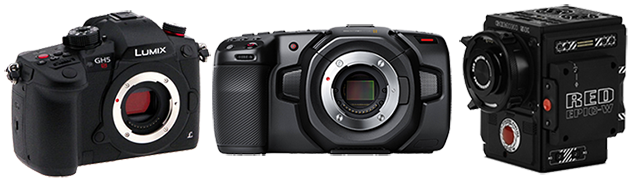
Having trouble deciding which cinema system to use for your next project? The trade-off between quality and budget is always a tricky dilemma. Of course, we all wish we could use a system like the RED Gemini to get the best quality footage but spending thousands to rent or purchase a system like this is not always possible. For this reason, filmmakers often look to more affordable video systems like the Panasonic GH5S – a smaller, budget-friendly mirrorless camera with very competitive video recording specs. There now exist some ‘disruptor cameras’ like the Blackmagic Pocket Cinema Camera 4K that provide filmmakers with certain sought-after features, previously only attainable with high-budget projects, now at a very low price point. This article will outline the pros and cons of three cinema cameras – the RED Gemini, Panasonic GH5s, and the Blackmagic Pocket Cinema Camera 4K – and recount our thoughts after comparing these cameras side-by-side on both land and underwater in the field.
You have probably heard about the Blackmagic Pocket Cinema Camera 4K. It’s the newest release in a niche market of affordable cinema cameras. There has been a lot of hype around this little camera, as it boasts some features that nobody thought would be found in a $1300 package. Uncompressed RAW capture at 4K 60p – to name one of these – is a feature that was previously held captive by the highest tier of cinema systems. Enter: The People’s Camera – providing starving-artist-filmmakers access to some of the most sought-after, high-end cinema camera functionality.
So, does the Blackmagic Pocket Cinema Camera 4K deliver? Or is it too good to be true? To find out we at Bluewater Photo decided to put it to the test. We sandwiched the Pocket 4K between two staples in the video realm – the Panasonic GH5s and the RED Gemini. First, we did a comparison of the three systems in a more controlled setting on land to test their color science, low-light capabilities, and slow-motion capture. Then to top it all off, we took all three cameras underwater with Nauticam housings to test their versatility as underwater cinema systems.
On land, we had all three systems next to each other on tripods. We used lenses with equivalent 24mm focal lengths and ND filters on each lens with an equivalent number of stops. We also shot at the same setting and the shot the same subjects. Underwater we had three divers, one with each underwater system, and we shot the same settings and subjects underwater as well.

Video Comparison | Land Tests | Underwater Tests | Overview | Conclusion
Land Tests with Panasonic GH5s, Blackmagic Pocket Cinema Camera 4K and RED Gemini 5K
Size Comparison
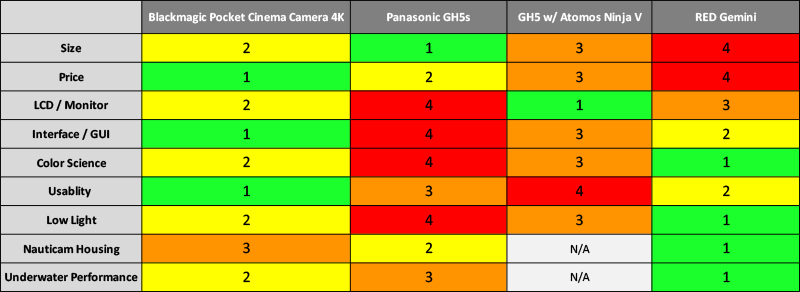
Before we get into the nitty gritty, it’s first worth talking about the usability of each system. The first thing you notice about the Blackmagic Pocket Cinema Camera 4K (BMPCC4K) is its size. It’s small, super lightweight, and all around has a great feel. Compared to the GH5s, it’s slightly larger in physical size but weighs pretty much the same. Now obviously, the RED Gemini DSMC2 is significantly larger and more cumbersome than either the Blackmagic or the GH5s. Although a simple deduction, size is an important factor to consider when choosing which cinema system is right for you. If you are the run-and-gun shooter who can’t be bogged down by a heavy, full-size cinema camera with all the intricate bells and whistles, or simply want to travel light, then right off the bat it is safe to conclude that the BMPCC4K or the GH5s is a better choice for you.
LCD Screen / Monitor Comparison
The next thing that is immediately obvious when shooting these three systems side by side is the LCD screen. In this regard, to make things fair we shot the GH5s with the Atomos Ninja V external monitor. The BMPCC4K, with its built in 5” LCD screen, was just as bright and user-friendly as the Ninja V monitor on the GH5s and even larger than the REDTouch 4.7” monitor. When shooting the three systems, we felt no need to have an external monitor on the BMPCC4K, which was another huge factor in limiting the size of the system and made it all-around very compact and easy.
Interface / Menu / GUI Comparison
The RED Gemini and the BMPCC4K take the cake when it comes to GUI. The touchscreen interface on both systems were far more straightforward and user-friendly compared to the numerous folders and tabs on the GH5s. We had to upgrade the firmware of the BMPCC4K before we took it out to shoot. This was also extremely straightforward and only took us about 10 minutes. It’s safe to say that one could grab the BMPCC4K right out of the box and know how to use it – it’s just that easy.
Color Science Comparison
We now enter territory where the BMPCC4K and GH5s are unfairly matched to compete with the RED Gemini. Still, the color rendition of the BMPCC4K was quite impressive. The GH5s was outmatched by the BMPCC4K when the GH5s was recording internally. With that being said, the two were quite comparable when the GH5s was recording to the Ninja V and the BMPCC4K was recording internally or to an SSD drive. The RAW recording capabilities of the Blackmagic allow for much more control and latitude in the post processing phase when it comes to color than the GH5s, which I think most would agree is a massive perk. The color science of the RED Gemini obviously outmatched both the BMPCC4K and the GH5s by a lot, but that’s what the extra $18K is for.
Low Light Comparison
This is another area where the Blackmagic shines but again, neither cameras came close to the RED when pushed to their limits. When recording to the Ninja V on land, the GH5s was comparable to the BMPCC4K but recording internally, the BMPCC4K outperformed the GH5s. The dual native ISO on the BMPCC4K was quite effective and yet another great feature offered with this camera.
Underwater Tests with Panasonic GH5s, Blackmagic Pocket Cinema Camera 4K and RED Gemini 5K

When shooting underwater video, there are many other factors to consider with a cinema system. Battery life, date storage, size, weight, and access to the menu system and function buttons are all even more important considerations underwater. Many of these are, of course, a function of the underwater housing that you use to take your system underwater. For this comparison we used Nauticam housings since Nauticam is a leading manufacturer in professional-grade underwater housings and they are currently the only manufacturer to make an underwater housing for the BMPCC4K.
Underwater Housing Comparison
It is difficult to say which underwater housing is the best between the BMPCCII, RED Weapon LT and the Nauticam GH5s, as they are all quite unique and have their own special attributes. With that being said, there are some truly innovative nuances to the Blackmagic housing. To start, Nauticam integrated an external battery pack cage into the bottom of the housing. Short battery life is a major downside of the BMPCC4K and when shooting underwater, you do not want to have to keep pulling the vacuum and changing batteries with a wet housing. When used with four 18650 3400mAh batteries, the external battery pack cage in the BMPCCII housing extends the battery life to around 3-4 hours, depending on your usage. This is a brand-new feature in Nauticam housings and it was greatly appreciated when we took it into the field.
Another particularly innovative feature of the BMPCCII underwater housing is the integrated SSD drive holder. A notch at the top of the Nauticam housing snugly holds a T5 compact SSD, which is connected to the camera via USB-C and allows for recording of RAW or ProRes video to high-capacity edit-ready media. With the large files generated when shooting RAW or even ProRes, this extra storage is necessary and plays an additional role in the amount of time you can shoot underwater before needing to open the housing to change media.
The third major innovation of the BMPCCII is the M28 bulkhead, which supports the use of an HDMI 2.0 recorder such as the Atomos Ninja V. Other than that, Nauticam simply did an amazing all-around job with this housing. With a camera that is primarily controlled through the touchscreen, the Nauticam underwater housing still provides you access to all major functions of the camera. You have full control over ISO, shutter speed, iris, white balance, autofocus and the playback menu. You can also switch between frame rates using the HFR button and use the three customizable function buttons at the top to check things like focus peaking, exposure and false color.
One downside of the BMPCC4K camera is that it only offers single-point autofocus. For a camera that focuses entirely on motion picture, this is disappointing and a continuous autofocus system would have been greatly appreciated. With that being said, Nauticam offers focus gear for numerous supported MFT lenses so manual focus is easily achievable – which is preferred for underwater video shooting anyway.
The RED Weapon LT and the GH5s housings are exceptionally well designed as well. One aspect that stuck out with the Weapon LT housing was that although the system is extremely heavy on the surface, it is very well balanced underwater and with the included trim weights, the system is rock-solid underwater. When trimmed properly, the Weapon LT housing is like a sturdy tripod underwater – staying perfectly horizontal and requiring only minor adjustments with the handles to achieve beautiful, smooth panning shots.
The GH5s housing is more similar to Nauticam’s other DSLR and mirrorless housings, providing absolute full control over every function of the camera and access to all menu systems. It is ergonomically designed, small, lightweight and travel friendly. One innovation of the Nauticam GH5s housing is the conveniently located tripod mounting screws, which allows you to get very steady underwater macro video even in surging conditions.
So in conclusion, no single housing is necessarily better than the other. The BMPCCII has arguably the most innovations incorporated into the design and in terms of size, falls somewhere in the middle. However, in order to have a 5” monitor equivalent we needed to attach the Nauticam SmallHD monitor housing to the GH5, which made the system nearly 2x larger than the BMPCCII with its built-in 5” monitor. At the same time however, you have far more control over the menu systems and functionality when shooting with the GH5s than you do with the BMPCCII, as much of the control of the BMPCC4K is via touch-screen. And finally, the RED Weapon LT perhaps takes the cake when it comes to ergonomics, access to the camera functions, and weight displacement underwater; however, the Weapon LT housing is massive. If you are traveling often it would be a pain to drag around the heavy Weapon LT housing and you might rather go for the more compact housing of the BMPCCII without sacrificing RAW-recording capabilities.
Underwater Performance Comparison
Other than the physical differences of the three housings, all cameras performed quite well underwater, and compared similarly to the land tests. As expected, the RED Gemini outperformed the GH5s and BMPCC4K in nearly every category. Since we were unable to record media from the GH5s to the Atomos Ninja V underwater, the BMPCC4K with its RAW-recording capabilities outperformed the GH5s in low-light and color rendition.
Monitor Options for Underwater Video
The Panasonic GH5s, Blackmagic Pocket Cinema Camera 4K and RED Gemini all have fantastic monitor options when shooting underwater with the Nauticam underwater housings. The Nauticam GH5s housing comes in two different styles, one with the normal M14 and M16 bulkhead openings and on with an M28 bulkhead, which facilitated use of HDMI-2.0 and Atomos Ninja V monitor housing. For optimal underwater video with the GH5 or GH5s, it is best to shoot with the Atomos Ninja V monitor, as it functions as an external recorder and allows for 4K 60p video capture.
The Nauticam BMPCCII underwater housing for the Blackmagic Pocket Cinema Camera 4K comes equipped with an M28 bulkhead, which makes using the Nauticam Atomos Ninja V monitor housing easy. This would be the optimal choice as an external monitor for the Blackmagic Pocket Cinema Camera 4K, as it facilitates external recording as well. For a more affordable monitor that does not function as an external monitor but allows for easier viewing underwater, the 5” SmallHD monitors with Nauticam housings are a fantastic option as well.
For the RED Gemini and Nauticam housings, it is recommended to use the RED Touch 4.7” or 7.0” monitors and Nauticam monitor housings. These can be attached via any of the built-in M16 bulkheads available on the Nauticam RED Weapon LT Underwater Housing.
Overview – Pros & Cons of the Panasonic GH5s, RED Gemini, and Blackmagic Pocket Cinema Camera
Panasonic GH5s - Pros & Cons
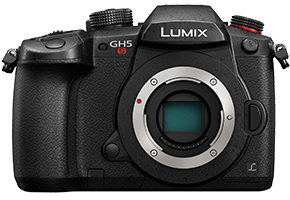
The Panasonic GH5s performed quite well on land with the Atomos Ninja V monitor/recorder. This allowed us to shoot at 4K 60p and helped tremendously with color rendition and low light capability. It was by far the most compact camera compared to the RED Gemini and the Blackmagic Pocket Cinema Camera 4K, however, with the addition of the Atomos Ninja V monitor, it was significantly larger than the Blackmagic Pocket camera. The major Pros for the GH5s are its size, weight, and versatility as a stills camera as well. The major Cons for the GH5s are that it requires an external recorder to record in 4K 60p, the menu system / GUI is cluttered and comparatively challenging to navigate, and it required a slightly higher budget than the Blackmagic Pocket camera.
|
Pros
|
Cons
|
RED Gemini – Pros & Cons
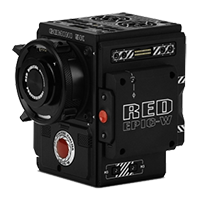
The RED Gemini, as expected, did not disappoint when recording both on land and underwater. It produced by far the she sharpest, highest quality footage with fantastic color rendition and low-light performance. The GUI is straightforward and easy to navigate both on land and with the Nauticam Weapon LT housing underwater. The major pros of the RED Gemini are the image quality, 5K resolution, low-light performance, high frame rate options, and usability. The only real cons of the RED Gemini are cost and size, as it requires a large budget for a full system setup and both the camera body itself and the underwater housing are significantly larger than either the GH5s or the Blackmagic Pocket.
|
Pros
|
Cons
|
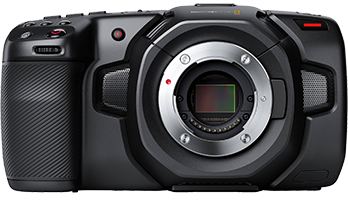
Blackmagic Pocket Cinema Camera 4K – Pros & Cons
The Blackmagic Pocket Cinema Camera 4K performed surprisingly well compared to the GH5s and the RED Gemini. Although it couldn’t fit in our pockets, it really was quite small and, with the built-in 5” LCD screen, was significantly smaller than the GH5s with a 5” external monitor/recorder. It outperformed the GH5s in many comparisons such as in-camera low-light performance, image quality and post-processing latitude. Being able to record RAW at 4K 60p with a camera body that is less expensive than the GH5s was the thing that impressed us the most and the footage captured did not disappoint us. The major pros of the Blackmagic Pocket Cinema Camera 4K are its size, price point, 5” LCD screen, RAW and ProRes recording capability, and media recording options. The major cons of the Blackmagic Pocket Cinema Camera 4K are its lack of a continuous autofocus mode, battery life, and lack of a viewfinder.
|
Pros
|
Cons
|
Transcript of GH5 / Red / Blackmagic Pocket 4K Comparison Video:
We did a comparison between the GH5, the new Blackmagic Pocket 4K, and the RED Gemini topside and underwater. Obviously, the RED is in a class of its own, but it stands to show how the GH5 and Blackmagic stack up. We tried out high frame rates and pushed the cameras to their recording limits. While topside we used the Atomos Ninja V with the GH5 which allowed us to record Apple Prores 422HQ.
The GH5 and Blackmagic cameras are mirrorless micro four thirds cameras while the RED has a super 35 sensor. The GH5 is a photo/video hybrid with a slight emphasis on video, while the RED and Blackmagic are purely cinema cameras.
It’s hard to tell the difference between the three cameras especially when looking at it on your computer screen, you really have to go into the colors while editing to see the major differences between these cameras. We were very pleased with all three of these cameras. The Blackmagic was such an upgrade from their previous rendition.
We shot the GH5 and the Blackmagic in 4k 60fps, but the Red in 5k 96fps so again, it’s not really fair to compare the red, but the Blackmagic and GH5 definitely hold up and are great prosumer cameras.
As you can see we only did a simple color grade to this footage. We were very impressed with the Blackmagic’s color science and low light capabilities for being such a low price point.
It’s lowlight ability was better than the GH5, but it remains to be seen how the newer iteration of the GH5 the GH5s which is far better suited for low light, will stack up against the blackmagic.
Both the Panasonic GH5 and the Blackmagic pocket 4k cinemas have a one-inch micro-four thirds sensor, which is 18mm by 13.5mm. They both accept micro-four thirds lenses, which are manufactured by both Olympus and Panasonic. The Panasonic 7-14mm and 12-35mm lenses are popular choices for video, and are equivalent to 14-28mm and 24-70mm respectively on a full-frame camera.
Underwater Video Section:
We took all 3 cameras underwater in the cold, lush waters of Catalina Island, which is part of the channel islands in southern california. We used nauticam underwater housings from bluewater photo’s rental fleet. Nauticam housings are machine-crafted high-quality aluminum housings, with ergonomic controls easy to use with gloves on. The housings had dome ports matched with wide-angle zoom lenses for maximum flexibility underwater. We filmed with natural light or with Light & Motion and Kraken underwater video lights for all of the underwater footage. The housings were easy to maneuver underwater and had fairly neutral buoyancy. The GH5 and Black magic housings are noticeable smaller and lighter than housings for traditional cinema cameras.
Underwater we were not able to use the Ninja with the GH5 so our max recording was 4K 60 at 420 8bit which you can see a difference with.
One larger drawback we noticed with the Blackmagic underwater was the autofocus. The GH5 was faster and had better autofocus options while the Blackmagic is single point only. The RED doesn’t have an autofocus option, but the zoom and focus gears on the RED housing are designed with cinema in mind making them extremely smooth.
In this shot of the lobsters you can see the GH5 being pushed to its limits. In this shot we are not using any lights and you can see how much better the Blackmagic handles the low light situation.
We’re not trying to sponsor the Blackmagic, but for its $1295 price point, it’s hard to beat. Using the Blackmagic was similar to using the GH5 with a Ninja monitor. As a primary camera for newer cinematographers or even a secondary camera for experienced ones, the new Pocket is a great price for what it has to offer.
Thank you for watching the video and please respond with any questions you might have.
Conclusion
So which cinema system is for you? It really depends on what you are looking for. If you have the budget and demand the absolute highest quality footage, RED Digital Cinema is for you and the Nauticam Weapon LT is your best option for underwater functionality. If you are interested in something more versatile and like to take still images, the GH5 or GH5s is a fantastic option. But at the end of the day, there is nothing on the market that competes with the quality of the Blackmagic Pocket Cinema Camera 4K at a $1300 price tag. The BMPCC4K is less expensive than the GH5s AND records in RAW and ProRes at 4K 60p. It is not a RED Gemini when it comes to image quality or low-light performance, but it’s the best cinema system you are going to get without financing options.